Framework Compatibility & DevOps Guide
Geodesia G-1 is model-agnostic and framework-agnostic. It sits in front of your inference server as a thin, stateless validation layer and inspects every request and response — it does not care how the tokens are produced, only that the server speaks a protocol it understands.
The golden rule: if your serving stack exposes an OpenAI-compatible
/v1/chat/completionsendpoint (or the Ollama API), Geodesia G-1 drops in front of it with zero changes to your application — you only change thebase_urlyour client points at.
This page is the operator's reference: the compatibility matrix, per-framework setup, and the production deployment, scaling, observability, security, and troubleshooting playbook.
At a Glance
Drop-in
Stateless proxy on port 8800. Point your OpenAI client at it; point it at your model. No retraining, no app changes.
Horizontally scalable
The gateway holds no per-request state. Run N replicas behind a load balancer; share one audit database.
Probe-friendly
/health reports upstream reachability, log-prob support, and active axes — wire it straight into liveness/readiness probes.
Hardening-ready
API-key passthrough, TLS at the edge, blocking-mode enforcement, and a tamper-evident audit chain out of the box.
The One Rule That Decides Everything: Log-Probabilities
There is exactly one upstream capability that changes how many detection axes you get:
Does the upstream return per-token log-probabilities?
Log-probabilities express how confident the model was when it chose each word. Geodesia uses them for the closed-book fabrication axis (catching confidently-invented facts when there is no grounding context).
| Upstream returns log-probs | Active axes | What you lose without them |
|---|---|---|
| ✅ Yes | 5 axes | nothing |
| ❌ No | 4 axes | closed-book fabrication only — context faithfulness, prompt safety, answer safety, and jailbreak all still run |
No setting toggles this — the gateway probes it on the first request and /health reports the result. You can recover the 5th axis later with a log-prob sidecar.
Make axes an alerting signal
Treat an unexpected drop from axes: 5 to axes: 4 in /health as a degradation alert — it means your upstream stopped returning log-probabilities (model change, tier change, flag dropped).
Compatibility Matrix
| Framework | upstream_type | Protocol | Log-probs | Axes | Best for |
|---|---|---|---|---|---|
| vLLM | vllm | OpenAI | ✅ | 5 | Production on NVIDIA GPUs |
| SGLang | sglang | OpenAI | ✅ | 5 | High-throughput production |
| TensorRT-LLM | trtllm | OpenAI | ✅ | 5 | Maximum NVIDIA performance |
| llama.cpp | openai | OpenAI | ✅ | 5 | CPU / Apple Silicon / GGUF |
| Ollama | ollama | Ollama | ✅ native (≥ 0.12) | 5 (older: 4, or sidecar) | Local dev, easiest setup |
| OpenAI API | openai | OpenAI | ✅ | 5 | Managed frontier models |
| Azure · Together · Groq · Mistral · Fireworks · OpenRouter | openai | OpenAI | ✅* | 5* | Hosted open models |
| TGI (Hugging Face) | openai | OpenAI | ✅ | 5 | Hugging Face stack |
| LM Studio | openai | OpenAI | ✅ | 5 | Desktop / local GUI |
| LocalAI | openai | OpenAI | ✅ | 5 | Self-hosted drop-in |
| Internal (self-managed) | internal | OpenAI | ✅ | 5 | Single-GPU, gateway owns lifecycle |
* Hosted providers expose log-probabilities on most—but not all—models and tiers; the gateway falls back to 4 axes automatically when they are absent.
Where Geodesia Sits

The gateway is the only thing your application talks to. It is stateless; all durable state lives in the shared audit database.
Choosing the Right Type

Anything OpenAI-compatible that is not vLLM / SGLang / TensorRT-LLM uses type: openai.
Configure It — Three Equivalent Ways
Every framework below is configured identically; only the values change.
Settings → Service Connection → choose type, enter URL (and API key if hosted), Test connection, pick the model, Save.
| Config field | Env var | Meaning |
|---|---|---|
upstream_type | GW_UPSTREAM_TYPE | vllm · sglang · trtllm · openai · ollama · internal |
upstream_base_url | GW_UPSTREAM_URL | Base URL of the server (no trailing /v1) |
upstream_model | GW_UPSTREAM_MODEL | Model name as the upstream knows it |
upstream_api_key | GW_API_KEY | Bearer token; empty for local servers |
| — | GW_MAXLEN | Max tokens the detector reads (latency vs recall) |
| — | GW_BLOCK_INPUT / GW_BLOCK_OUTPUT | 1 = block flagged content, 0 = annotate only |
Always verify after configuring
Run POST /upstream/test (or the Test connection button) — it reports reachability, latency, the model list, and whether log-probabilities are available. See Upstream Backends.
Per-Framework Setup
vLLM
The recommended production backend on NVIDIA GPUs. Returns log-probabilities natively → 5 axes.
Configure:
curl -X POST http://localhost:8800/v1/glad/gateway/config \
  -d '{"upstream_type":"vllm","upstream_base_url":"http://localhost:8000",
       "upstream_model":"meta-llama/Llama-3-8B-Instruct"}'
SGLang
OpenAI-compatible, log-probabilities supported → 5 axes. Default port 30000.
python -m sglang.launch_server \
  --model-path meta-llama/Llama-3-8B-Instruct --port 30000

curl -X POST http://localhost:8800/v1/glad/gateway/config \
  -d '{"upstream_type":"sglang","upstream_base_url":"http://localhost:30000",
       "upstream_model":"meta-llama/Llama-3-8B-Instruct"}'
TensorRT-LLM
NVIDIA's maximum-performance engine, fronted by an OpenAI-compatible server (TensorRT-LLM serving frontend or Triton). Log-probabilities supported → 5 axes.
curl -X POST http://localhost:8800/v1/glad/gateway/config \
  -d '{"upstream_type":"trtllm","upstream_base_url":"http://localhost:8000",
       "upstream_model":"llama-3-8b"}'
Build with log-probs enabled
Ensure the engine is built so the serving frontend can request logprobs. If absent, the gateway runs in 4-axis mode.
llama.cpp
llama-server is OpenAI-compatible and returns log-probabilities → 5 axes, even on CPU or Apple Silicon. Use type: openai.
./llama-server -m ./models/llama-3-8b-instruct.Q4_K_M.gguf \
  --host 0.0.0.0 --port 8080

curl -X POST http://localhost:8800/v1/glad/gateway/config \
  -d '{"upstream_type":"openai","upstream_base_url":"http://localhost:8080",
       "upstream_model":"llama-3-8b-instruct","upstream_api_key":""}'
Why openai and not a llamacpp type
llama.cpp speaks the OpenAI protocol, so it uses the generic openai type — the same as TGI, LM Studio, and LocalAI. Anything OpenAI-compatible you host yourself is openai with an empty API key.
Ollama
The easiest local runtime. Ollama ≥ 0.12 exposes per-token log-probabilities on its OpenAI-compatible /v1/chat/completions endpoint, so Geodesia runs in full 5-axis mode automatically — the gateway probes that endpoint on the first request and turns the closed-book fabrication axis on with no extra configuration.
curl -X POST http://localhost:8800/v1/glad/gateway/config \
  -d '{"upstream_type":"ollama","upstream_base_url":"http://localhost:11434",
       "upstream_model":"llama3.2"}'
Check the probe result
GET /health reports axes: 5 once the log-prob probe succeeds. If you see axes: 4 on a recent Ollama, make sure you're on 0.12 or newer (older builds did not expose log-probs).
Older Ollama — recover the closed-book axis with a log-prob sidecar
On Ollama < 0.12 (no native log-probs) you stay in 4-axis mode. You can recover the closed-book axis by running a second server for the same model that does expose log-probabilities — typically llama.cpp on the same GGUF. The gateway re-derives the answer through the sidecar to recover the signal (only used when native log-probs are absent).

./llama-server -m ./models/llama3.2.gguf --port 8080   # the sidecar

curl -X POST http://localhost:8800/v1/glad/gateway/config \
  -d '{"upstream_type":"ollama","upstream_base_url":"http://localhost:11434",
       "upstream_model":"llama3.2",
       "ollama_logprob_sidecar_url":"http://localhost:8080",
       "ollama_logprob_sidecar_model":"llama3.2"}'
OpenAI API and Hosted Services
Use type: openai for the OpenAI API and any hosted OpenAI-compatible provider.
curl -X POST http://localhost:8800/v1/glad/gateway/config \
  -d '{"upstream_type":"openai","upstream_base_url":"https://api.openai.com",
       "upstream_api_key":"sk-...","upstream_model":"gpt-4o"}'
| Provider | upstream_base_url |
|---|---|
| OpenAI | https://api.openai.com |
| Azure OpenAI | https://<resource>.openai.azure.com |
| Together AI | https://api.together.xyz |
| Groq | https://api.groq.com/openai |
| Mistral AI | https://api.mistral.ai |
| Fireworks | https://api.fireworks.ai/inference |
| OpenRouter | https://openrouter.ai/api |
Secrets belong in a secret store
Never bake upstream_api_key into an image or commit it. Inject it via GW_API_KEY from a Kubernetes Secret, Docker secret, or your vault. See Security Hardening.
Text Generation Inference (TGI)
Hugging Face TGI exposes an OpenAI route and returns log-probabilities → 5 axes. type: openai, default port 8080.
curl -X POST http://localhost:8800/v1/glad/gateway/config \
  -d '{"upstream_type":"openai","upstream_base_url":"http://localhost:8080",
       "upstream_model":"tgi"}'
LM Studio
Local OpenAI-compatible server (default port 1234) with log-probabilities → 5 axes.
curl -X POST http://localhost:8800/v1/glad/gateway/config \
  -d '{"upstream_type":"openai","upstream_base_url":"http://localhost:1234",
       "upstream_model":"local-model"}'
LocalAI
Self-hosted OpenAI drop-in (default port 8080). type: openai.
curl -X POST http://localhost:8800/v1/glad/gateway/config \
  -d '{"upstream_type":"openai","upstream_base_url":"http://localhost:8080",
       "upstream_model":"gpt-3.5-turbo"}'
Internal (self-managed vLLM)
The gateway launches and manages its own vLLM subprocess, starting it on selection and freeing the GPU when you switch away — ideal for single-GPU hosts.
curl -X POST http://localhost:8800/v1/glad/gateway/config \
  -d '{"upstream_type":"internal",
       "internal_vllm_cmd":"python -m vllm.entrypoints.openai.api_server --model my-model --port 8000",
       "internal_vllm_url":"http://localhost:8000",
       "upstream_model":"my-model"}'
Production Topologies
1 · Single node — Docker Compose
The simplest production unit: the model server and the gateway side by side.

The repository ships deploy/docker-compose.gateway.yml with two services — generator (the model) and glad-gateway (the validator) — and two profiles:
# Fixed checkpoint
docker compose -f deploy/docker-compose.gateway.yml --profile fixed up -d

# New model / new customer
docker compose -f deploy/docker-compose.gateway.yml --profile customer up -d
A minimal .env to drive it:
# .env
GW_UPSTREAM_TYPE=vllm
GW_UPSTREAM_URL=http://generator:8000
GW_UPSTREAM_MODEL=meta-llama/Llama-3-8B-Instruct
GW_BLOCK_INPUT=1
GW_BLOCK_OUTPUT=1
GW_MAXLEN=2048
2 · Kubernetes
The gateway is stateless → run it as a Deployment with N replicas behind a Service, mount the upstream as another Service, keep secrets in a Secret, and wire /health to probes.

apiVersion: apps/v1
kind: Deployment
metadata:
  name: geodesia-gateway
spec:
  replicas: 3
  selector: { matchLabels: { app: geodesia-gateway } }
  template:
    metadata: { labels: { app: geodesia-gateway } }
    spec:
      containers:
        - name: gateway
          image: registry.geodesia.ai/gateway:1.0   # your licensed image
          ports: [{ containerPort: 8800 }]
          env:
            - { name: GW_UPSTREAM_TYPE,  value: "vllm" }
            - { name: GW_UPSTREAM_URL,   value: "http://model:8000" }
            - { name: GW_UPSTREAM_MODEL, value: "meta-llama/Llama-3-8B-Instruct" }
            - { name: GW_BLOCK_INPUT,    value: "1" }
            - { name: GW_BLOCK_OUTPUT,   value: "1" }
            - name: GW_API_KEY
              valueFrom: { secretKeyRef: { name: geodesia-secrets, key: upstream-api-key } }
          readinessProbe:
            httpGet: { path: /health, port: 8800 }
            initialDelaySeconds: 10
            periodSeconds: 10
          livenessProbe:
            httpGet: { path: /health, port: 8800 }
            initialDelaySeconds: 30
            periodSeconds: 20
---
apiVersion: v1
kind: Service
metadata: { name: geodesia-gw }
spec:
  selector: { app: geodesia-gateway }
  ports: [{ port: 8800, targetPort: 8800 }]
---
apiVersion: autoscaling/v2
kind: HorizontalPodAutoscaler
metadata: { name: geodesia-gateway }
spec:
  scaleTargetRef: { apiVersion: apps/v1, kind: Deployment, name: geodesia-gateway }
  minReplicas: 2
  maxReplicas: 10
  metrics:
    - type: Resource
      resource: { name: cpu, target: { type: Utilization, averageUtilization: 70 } }
Keep the GPU pool separate
Run the gateway on cheap CPU nodes and the model on GPU nodes. The validator is lightweight; only the upstream needs a GPU. This lets you scale the two independently and pack GPUs efficiently.
3 · systemd (bare metal / VM)
# /etc/systemd/system/geodesia-gateway.service
[Unit]
Description=Geodesia G-1 Gateway
After=network-online.target

[Service]
Environment=GW_UPSTREAM_TYPE=vllm
Environment=GW_UPSTREAM_URL=http://127.0.0.1:8000
Environment=GW_UPSTREAM_MODEL=my-model
Environment=GW_BLOCK_INPUT=1
EnvironmentFile=-/etc/geodesia/gateway.env       # secrets here
ExecStart=/opt/geodesia/bin/start-gateway --host 0.0.0.0 --port 8800
Restart=always
RestartSec=3

[Install]
WantedBy=multi-user.target
Health, Readiness & Probes
The gateway's /health is designed to be both a liveness and a readiness signal.
{
  "ok": true,
  "upstream_type": "vllm",
  "upstream": "http://localhost:8000",
  "internal_vllm": "stopped",
  "logprobs": true,
  "axes": 5
}
| Field | Use it for |
|---|---|
ok | Liveness — process is up and serving |
upstream / upstream_type | Confirm the configured backend |
logprobs | Readiness for full validation — false means 4-axis mode |
axes | Capability gauge — alert on an unexpected 5 → 4 drop |
internal_vllm | Lifecycle state when type: internal (running / stopped) |
The product backend exposes its own lightweight check at GET /v1/glad/health for the compliance plane.
| Probe | Endpoint | Recommended timing |
|---|---|---|
| Readiness | GET :8800/health | initialDelay 10s · period 10s |
| Liveness | GET :8800/health | initialDelay 30s · period 20s |
| Compliance plane | GET :8199/v1/glad/health | period 30s |
Observability
Every response carries a geodesia{} block — your richest telemetry source. Ship it to your logging pipeline and build dashboards on it.
| Source | What you get | How |
|---|---|---|
geodesia{} payload | Per-call axis scores, brake decision, dominant axis, latency | Parse from each API response (see Response Format) |
/health | Liveness, upstream, log-prob mode, active axes | Poll on an interval; alert on ok=false or axes drop |
| Compliance dashboard | Aggregated pass / block / flag counts, per-axis rates | GET :8199/v1/glad/dashboard |
| Audit chain | Tamper-evident per-call ledger | GET :8199/v1/glad/chain/entries |
| Container logs | Startup, log-prob probe, upstream errors | docker logs / kubectl logs |
Alerts worth wiring:
/healthok=falsefor > 1 probe → gateway downaxesdrops5 → 4unexpectedly → upstream stopped returning log-probs- block rate spikes on
prompt_safetyorjailbreak→ possible attack / misconfig - block rate spikes on
halluc_context→ upstream model or RAG regression - audit-chain verification failing (
GET /v1/glad/chain/verify) → integrity incident
Security Hardening

- Terminate TLS at the edge (nginx / ingress); keep the gateway and the model on a private network. Never expose the model port publicly — the gateway is the only intended entry point.
- Inject secrets, never bake them.
GW_API_KEYand any license token come from a KubernetesSecret, Docker secret, or vault — not from the image or git. - Turn on enforcement in production:
GW_BLOCK_INPUT=1andGW_BLOCK_OUTPUT=1. Inpassthroughmode the gateway annotates but does not withhold — appropriate for monitoring, not for protection. - Lock down the compliance plane (
:8199) to operators only; it exposes the kill switch, FRIA, and audit exports. - Verify the audit chain on a schedule (
GET /v1/glad/chain/verify) and alert on any failure.
Scaling & Performance
| Lever | Effect | Guidance |
|---|---|---|
| Gateway replicas | Throughput, HA | Stateless — add replicas freely behind a load balancer |
GW_MAXLEN | Detector latency vs recall | 2048 for long-context RAG faithfulness; drop to 512 to cut latency on short prompts |
| Blocking vs streaming | Time-to-first-token | Streaming with the mid-stream brake adds minimal overhead; the brake halts at token-cadence boundaries |
| Log-prob sidecar (older Ollama < 0.12) | +1 axis, +1 re-derivation | Only needed pre-0.12 (≥ 0.12 has native log-probs). Costs one extra generation per call — size the sidecar accordingly or accept 4-axis mode |
| GPU placement | Cost | Gateway on CPU nodes, model on GPU nodes — scale independently |
| Shared audit DB | Consistency | All replicas point at one database (managed Postgres-class store or shared volume) so the dashboard and chain stay coherent |
The gateway is not the bottleneck
The validator is small and fast relative to the upstream LLM. Capacity planning should start from your model server's throughput; the gateway scales horizontally and cheaply to match it.
Zero-Downtime Model / Framework Switch
The gateway hot-reloads configuration — you can repoint it without dropping traffic.
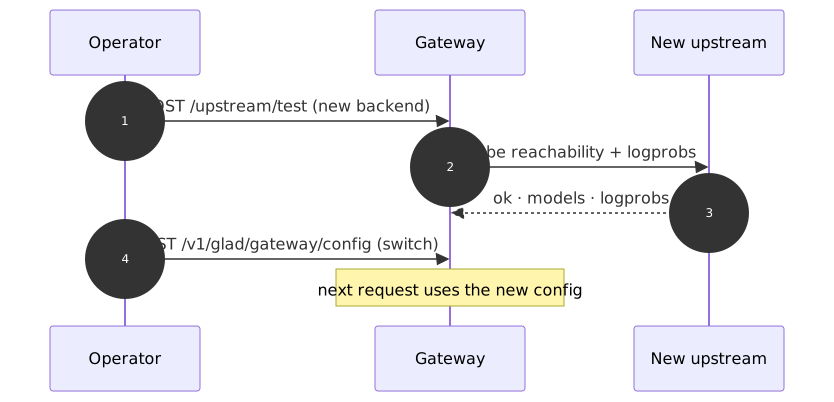
- Test the new backend first (
/upstream/test) — confirm reachability and log-prob support. - Switch (
POST /v1/glad/gateway/configor roll new env vars). The closed-book axis is cross-model and needs no per-model step — it works on the new upstream immediately.
In Kubernetes, prefer a rolling update of the Deployment with the new env vars; the readiness probe keeps traffic on healthy pods throughout.
Troubleshooting Runbook
| Symptom | Likely cause | Fix |
|---|---|---|
/health ok=false | Upstream unreachable | Check upstream_base_url, network policy, and that the model server is up |
axes: 4 when you expected 5 | Upstream returns no log-probs | Upgrade to Ollama ≥ 0.12 (native log-probs), use a model/tier that supports logprobs, or add a log-prob sidecar for older Ollama |
connection refused on switch | Wrong port or /v1 appended | Use the base URL (no trailing /v1); the gateway adds the path |
| Hosted API → 4 axes | Provider/model omits log-probs | Try another model on the provider, or accept 4-axis mode |
| First request very slow | Model cold-loading on first boot | Expected once per boot — the gateway warms the upstream proactively; subsequent requests are fast |
internal_vllm: stopped with type: internal | Subprocess failed to start | Check internal_vllm_cmd and GPU availability in container logs |
| 5xx from the gateway under load | Upstream saturated | Scale the model server; the gateway itself is rarely the limit |
| Benign prompts blocked | Thresholds too aggressive | Tune per-axis thresholds — see Detection Thresholds |
See Also
- Upstream Backends — the connection test and upstream-adapter mechanics
- Gateway Configuration — every
GatewayConfigfield - Environment Variables — the full
GW_*reference - Enforcement Modes — blocking vs passthrough
- Detection Thresholds — per-axis tuning
- API Response Format — the
geodesia{}payload