Framework Compatibility & DevOps Guide
G1-Proxy sits in front of your inference server as a thin, stateless HTTP hop — it never loads your weights and never replaces your serving stack. Any framework that speaks the OpenAI or Ollama wire format works. The one thing that varies between them is whether they expose per-token log-probabilities, which decides whether the closed-book axis can run.
Configure It — Three Equivalent Ways
Every framework below is configured identically; only the values change.
Settings → Service Connection → choose type, enter URL (and API key if hosted), Test connection, pick the model, Save.
| Config field | Env var | Meaning |
|---|---|---|
upstream_type | GW_UPSTREAM_TYPE | vllm · sglang · trtllm · openai · ollama · internal |
upstream_base_url | GW_UPSTREAM_URL | Base URL of the server (no trailing /v1) |
upstream_model | GW_UPSTREAM_MODEL | Model name as the upstream knows it |
upstream_api_key | GW_API_KEY | Bearer token; empty for local servers |
| — | GW_MAXLEN | Max tokens the detector reads (latency vs recall) |
| — | GW_BLOCK_INPUT / GW_BLOCK_OUTPUT | 1 = block flagged content, 0 = annotate only |
Always verify after configuring
Run POST /upstream/test (or the Test connection button) — it reports reachability, latency, the model list, and whether log-probabilities are available. See Upstream Backends.
Health, Readiness & Probes
The gateway's /health is designed to be both a liveness and a readiness signal.
{
  "ok": true,
  "upstream_type": "vllm",
  "upstream": "http://localhost:8000",
  "internal_vllm": "stopped",
  "logprobs": true,
  "axes": 5
}
| Field | Use it for |
|---|---|
ok | Liveness — process is up and serving |
upstream / upstream_type | Confirm the configured backend |
logprobs | Readiness for full validation — false means the closed-book axis is gated (it appears in axes_gated) |
axes | Capability gauge — alert on an unexpected 5 → 4 drop |
internal_vllm | Lifecycle state when type: internal (running / stopped) |
The product backend exposes its own lightweight check at GET /v1/glad/health for the compliance plane.
| Probe | Endpoint | Recommended timing |
|---|---|---|
| Readiness | GET :8800/health | initialDelay 10s · period 10s |
| Liveness | GET :8800/health | initialDelay 30s · period 20s |
| Compliance plane | GET :8199/v1/glad/health | period 30s |
At a Glance
Drop-in
Stateless proxy on port 8800. Point your OpenAI client at it; point it at your model. No retraining, no app changes.
Horizontally scalable
The gateway holds no per-request state. Run N replicas behind a load balancer; share one audit database.
Probe-friendly
/health reports upstream reachability, log-prob support, and active axes — wire it straight into liveness/readiness probes.
Hardening-ready
API-key passthrough, TLS at the edge, blocking-mode enforcement, and a tamper-evident audit chain out of the box.
The One Rule That Decides Everything: Log-Probabilities
There is exactly one upstream capability that changes how many detection axes you get:
Does the upstream return per-token log-probabilities?
Log-probabilities express how confident the model was when it chose each word. Geodesia uses them for the closed-book fabrication axis (catching confidently-invented facts when there is no grounding context).
| Upstream returns log-probs | Active axes | What you lose without them |
|---|---|---|
| ✅ Yes | 9 axes | nothing |
| ❌ No | 8 axes | closed-book fabrication only — every other axis still runs |
No setting toggles this — the gateway probes it on the first request and /health reports the result. You can recover the 5th axis later with a log-prob sidecar.
Make axes an alerting signal
Treat halluc_closedbook appearing in /health's axes_gated as a degradation alert — it means your upstream stopped returning log-probabilities (model change, tier change, flag dropped). Alert on axes_gated being non-empty, not on the axes count: axes is a property of the checkpoint and does not move when the upstream does.
Compatibility Matrix
| Framework | upstream_type | Protocol | Log-probs | Axes | Best for |
|---|---|---|---|---|---|
| vLLM | vllm | OpenAI | ✅ | 5 | Production on NVIDIA GPUs |
| SGLang | sglang | OpenAI | ✅ | 5 | High-throughput production |
| TensorRT-LLM | trtllm | OpenAI | ✅ | 5 | Maximum NVIDIA performance |
| llama.cpp | openai | OpenAI | ✅ | 5 | CPU / Apple Silicon / GGUF |
| Ollama | ollama | Ollama | ✅ native (≥ 0.12) | 5 (older: 4, or sidecar) | Local dev, easiest setup |
| OpenAI API | openai | OpenAI | ✅ | 5 | Managed frontier models |
| Azure · Together · Groq · Mistral · Fireworks · OpenRouter | openai | OpenAI | ✅* | 5* | Hosted open models |
| TGI (Hugging Face) | openai | OpenAI | ✅ | 5 | Hugging Face stack |
| LM Studio | openai | OpenAI | ✅ | 5 | Desktop / local GUI |
| LocalAI | openai | OpenAI | ✅ | 5 | Self-hosted drop-in |
| Internal (self-managed) | internal | OpenAI | ✅ | 5 | Single-GPU, gateway owns lifecycle |
* Hosted providers expose log-probabilities on most—but not all—models and tiers; the gateway falls back to 8 axes automatically when they are absent.
Where Geodesia Sits

The gateway is the only thing your application talks to. It is stateless; all durable state lives in the shared audit database.
Choosing the Right Type

Anything OpenAI-compatible that is not vLLM / SGLang / TensorRT-LLM uses type: openai.
Per-Framework Setup
vLLM
The recommended production backend on NVIDIA GPUs. Returns log-probabilities natively → all 9 axes.
Configure:
curl -X POST http://localhost:8800/v1/glad/gateway/config \
  -d '{"upstream_type":"vllm","upstream_base_url":"http://localhost:8000",
       "upstream_model":"meta-llama/Llama-3-8B-Instruct"}'
SGLang
OpenAI-compatible, log-probabilities supported → 5 axes. Default port 30000.
python -m sglang.launch_server \
  --model-path meta-llama/Llama-3-8B-Instruct --port 30000

curl -X POST http://localhost:8800/v1/glad/gateway/config \
  -d '{"upstream_type":"sglang","upstream_base_url":"http://localhost:30000",
       "upstream_model":"meta-llama/Llama-3-8B-Instruct"}'
TensorRT-LLM
NVIDIA's maximum-performance engine, fronted by an OpenAI-compatible server (TensorRT-LLM serving frontend or Triton). Log-probabilities supported → 5 axes.
curl -X POST http://localhost:8800/v1/glad/gateway/config \
  -d '{"upstream_type":"trtllm","upstream_base_url":"http://localhost:8000",
       "upstream_model":"llama-3-8b"}'
Build with log-probs enabled
Ensure the engine is built so the serving frontend can request logprobs. If absent, every other axis still runs and only halluc_closedbook is gated.
llama.cpp
llama-server is OpenAI-compatible and returns log-probabilities → 5 axes, even on CPU or Apple Silicon. Use type: openai.
./llama-server -m ./models/llama-3-8b-instruct.Q4_K_M.gguf \
  --host 0.0.0.0 --port 8080

curl -X POST http://localhost:8800/v1/glad/gateway/config \
  -d '{"upstream_type":"openai","upstream_base_url":"http://localhost:8080",
       "upstream_model":"llama-3-8b-instruct","upstream_api_key":""}'
Why openai and not a llamacpp type
llama.cpp speaks the OpenAI protocol, so it uses the generic openai type — the same as TGI, LM Studio, and LocalAI. Anything OpenAI-compatible you host yourself is openai with an empty API key.
Ollama
The easiest local runtime. Ollama ≥ 0.12 exposes per-token log-probabilities on its OpenAI-compatible /v1/chat/completions endpoint, so the closed-book fabrication axis is enabled automatically — the proxy probes that endpoint on the first request and turns it on with no extra configuration.
curl -X POST http://localhost:8800/v1/glad/gateway/config \
  -d '{"upstream_type":"ollama","upstream_base_url":"http://localhost:11434",
       "upstream_model":"llama3.2"}'
Check the probe result
GET /health reports logprobs: true and an empty axes_gated once the log-prob probe succeeds. If axes_gated still lists halluc_closedbook on a recent Ollama, make sure you're on 0.12 or newer (older builds did not expose log-probs).
Older Ollama — recover the closed-book axis with a log-prob sidecar
On Ollama < 0.12 (no native log-probs) the closed-book axis is gated and every other axis runs normally. You can recover it by running a second server for the same model that does expose log-probabilities — typically llama.cpp on the same GGUF. The gateway re-derives the answer through the sidecar to recover the signal (only used when native log-probs are absent).

./llama-server -m ./models/llama3.2.gguf --port 8080   # the sidecar

curl -X POST http://localhost:8800/v1/glad/gateway/config \
  -d '{"upstream_type":"ollama","upstream_base_url":"http://localhost:11434",
       "upstream_model":"llama3.2",
       "ollama_logprob_sidecar_url":"http://localhost:8080",
       "ollama_logprob_sidecar_model":"llama3.2"}'
OpenAI API and Hosted Services
Use type: openai for the OpenAI API and any hosted OpenAI-compatible provider.
curl -X POST http://localhost:8800/v1/glad/gateway/config \
  -d '{"upstream_type":"openai","upstream_base_url":"https://api.openai.com",
       "upstream_api_key":"sk-...","upstream_model":"gpt-4o"}'
| Provider | upstream_base_url |
|---|---|
| OpenAI | https://api.openai.com |
| Azure OpenAI | https://<resource>.openai.azure.com |
| Together AI | https://api.together.xyz |
| Groq | https://api.groq.com/openai |
| Mistral AI | https://api.mistral.ai |
| Fireworks | https://api.fireworks.ai/inference |
| OpenRouter | https://openrouter.ai/api |
Secrets belong in a secret store
Never bake upstream_api_key into an image or commit it. Inject it via GW_API_KEY from a Kubernetes Secret, Docker secret, or your vault. See Security Hardening.
Text Generation Inference (TGI)
Hugging Face TGI exposes an OpenAI route and returns log-probabilities → 5 axes. type: openai, default port 8080.
curl -X POST http://localhost:8800/v1/glad/gateway/config \
  -d '{"upstream_type":"openai","upstream_base_url":"http://localhost:8080",
       "upstream_model":"tgi"}'
LM Studio
Local OpenAI-compatible server (default port 1234) with log-probabilities → 5 axes.
curl -X POST http://localhost:8800/v1/glad/gateway/config \
  -d '{"upstream_type":"openai","upstream_base_url":"http://localhost:1234",
       "upstream_model":"local-model"}'
LocalAI
Self-hosted OpenAI drop-in (default port 8080). type: openai.
curl -X POST http://localhost:8800/v1/glad/gateway/config \
  -d '{"upstream_type":"openai","upstream_base_url":"http://localhost:8080",
       "upstream_model":"gpt-3.5-turbo"}'
Internal (self-managed vLLM)
The gateway launches and manages its own vLLM subprocess, starting it on selection and freeing the GPU when you switch away — ideal for single-GPU hosts.
curl -X POST http://localhost:8800/v1/glad/gateway/config \
  -d '{"upstream_type":"internal",
       "internal_vllm_cmd":"python -m vllm.entrypoints.openai.api_server --model my-model --port 8000",
       "internal_vllm_url":"http://localhost:8000",
       "upstream_model":"my-model"}'
Production Topologies
1 · Single node — Docker Compose
The simplest production unit: the model server and the gateway side by side.

The repository ships deploy/docker-compose.gateway.yml with two services — generator (the model) and glad-gateway (the validator) — and two profiles:
# Fixed checkpoint
docker compose -f deploy/docker-compose.gateway.yml --profile fixed up -d

# New model / new customer
docker compose -f deploy/docker-compose.gateway.yml --profile customer up -d
A minimal .env to drive it:
# .env
GW_UPSTREAM_TYPE=vllm
GW_UPSTREAM_URL=http://generator:8000
GW_UPSTREAM_MODEL=meta-llama/Llama-3-8B-Instruct
GW_BLOCK_INPUT=1
GW_BLOCK_OUTPUT=1
GW_MAXLEN=2048
2 · Kubernetes
The gateway is stateless → run it as a Deployment with N replicas behind a Service, mount the upstream as another Service, keep secrets in a Secret, and wire /health to probes.

apiVersion: apps/v1
kind: Deployment
metadata:
  name: geodesia-gateway
spec:
  replicas: 3
  selector: { matchLabels: { app: geodesia-gateway } }
  template:
    metadata: { labels: { app: geodesia-gateway } }
    spec:
      containers:
        - name: gateway
          image: registry.geodesia.ai/gateway:1.0   # your licensed image
          ports: [{ containerPort: 8800 }]
          env:
            - { name: GW_UPSTREAM_TYPE,  value: "vllm" }
            - { name: GW_UPSTREAM_URL,   value: "http://model:8000" }
            - { name: GW_UPSTREAM_MODEL, value: "meta-llama/Llama-3-8B-Instruct" }
            - { name: GW_BLOCK_INPUT,    value: "1" }
            - { name: GW_BLOCK_OUTPUT,   value: "1" }
            - name: GW_API_KEY
              valueFrom: { secretKeyRef: { name: geodesia-secrets, key: upstream-api-key } }
          readinessProbe:
            httpGet: { path: /health, port: 8800 }
            initialDelaySeconds: 10
            periodSeconds: 10
          livenessProbe:
            httpGet: { path: /health, port: 8800 }
            initialDelaySeconds: 30
            periodSeconds: 20

---

apiVersion: v1
kind: Service
metadata: { name: geodesia-gw }
spec:
  selector: { app: geodesia-gateway }
  ports: [{ port: 8800, targetPort: 8800 }]

---

apiVersion: autoscaling/v2
kind: HorizontalPodAutoscaler
metadata: { name: geodesia-gateway }
spec:
  scaleTargetRef: { apiVersion: apps/v1, kind: Deployment, name: geodesia-gateway }
  minReplicas: 2
  maxReplicas: 10
  metrics:
    - type: Resource
      resource: { name: cpu, target: { type: Utilization, averageUtilization: 70 } }
Keep the GPU pool separate
Run the gateway on cheap CPU nodes and the model on GPU nodes. The validator is lightweight; only the upstream needs a GPU. This lets you scale the two independently and pack GPUs efficiently.
3 · systemd (bare metal / VM)
# /etc/systemd/system/geodesia-gateway.service
[Unit]
Description=Geodesia G-1 Gateway
After=network-online.target

[Service]
Environment=GW_UPSTREAM_TYPE=vllm
Environment=GW_UPSTREAM_URL=http://127.0.0.1:8000
Environment=GW_UPSTREAM_MODEL=my-model
Environment=GW_BLOCK_INPUT=1
EnvironmentFile=-/etc/geodesia/gateway.env       # secrets here
ExecStart=/opt/geodesia/bin/start-gateway --host 0.0.0.0 --port 8800
Restart=always
RestartSec=3

[Install]
WantedBy=multi-user.target
Observability
Every response carries a geodesia{} block — your richest telemetry source. Ship it to your logging pipeline and build dashboards on it.
| Source | What you get | How |
|---|---|---|
geodesia{} payload | Per-call decision, reason (stage and deciding axis), per-axis scores | Parse from each API response (see Response Format) |
/health | Liveness, upstream, log-prob mode, active axes | Poll on an interval; alert on ok=false or axes drop |
| Compliance dashboard | Aggregated pass / block / flag counts, per-axis rates | GET :8199/v1/glad/dashboard |
| Audit chain | Tamper-evident per-call ledger | GET /v1/glad/chain/status · GET /v1/glad/chain/verify |
| Container logs | Startup, log-prob probe, upstream errors | docker logs / kubectl logs |
Alerts worth wiring:
/healthok=falsefor > 1 probe → gateway downaxesdrops5 → 4unexpectedly → upstream stopped returning log-probs- block rate spikes on
prompt_safetyorjailbreak→ possible attack / misconfig - block rate spikes on
halluc_context→ upstream model or RAG regression - audit-chain verification failing (
GET /v1/glad/chain/verify) → integrity incident
Security Hardening

- Terminate TLS at the edge (nginx / ingress); keep the gateway and the model on a private network. Never expose the model port publicly — the gateway is the only intended entry point.
- Inject secrets, never bake them.
GW_API_KEYand any license token come from a KubernetesSecret, Docker secret, or vault — not from the image or git. - Turn on enforcement in production:
GW_BLOCK_INPUT=1andGW_BLOCK_OUTPUT=1. Inpassthroughmode the gateway annotates but does not withhold — appropriate for monitoring, not for protection. - Lock down the compliance plane (
:8199) to operators only; it exposes the kill switch, FRIA, and audit exports. - Verify the audit chain on a schedule (
GET /v1/glad/chain/verify) and alert on any failure.
Scaling & Performance
| Lever | Effect | Guidance |
|---|---|---|
| Gateway replicas | Throughput, HA | Stateless — add replicas freely behind a load balancer |
GW_MAXLEN | Detector latency vs recall | 2048 for long-context RAG faithfulness; drop to 512 to cut latency on short prompts |
| Blocking vs streaming | Time-to-first-token | Streaming with the mid-stream brake adds minimal overhead; the brake halts at token-cadence boundaries |
| Log-prob sidecar (older Ollama < 0.12) | +1 axis, +1 re-derivation | Only needed pre-0.12 (≥ 0.12 has native log-probs). Costs one extra generation per call — size the sidecar accordingly, or accept that halluc_closedbook stays gated |
| GPU placement | Cost | Gateway on CPU nodes, model on GPU nodes — scale independently |
| Shared audit DB | Consistency | All replicas point at one database (managed Postgres-class store or shared volume) so the dashboard and chain stay coherent |
The gateway is not the bottleneck
The validator is small and fast relative to the upstream LLM. Capacity planning should start from your model server's throughput; the gateway scales horizontally and cheaply to match it.
Zero-Downtime Model / Framework Switch
The gateway hot-reloads configuration — you can repoint it without dropping traffic.
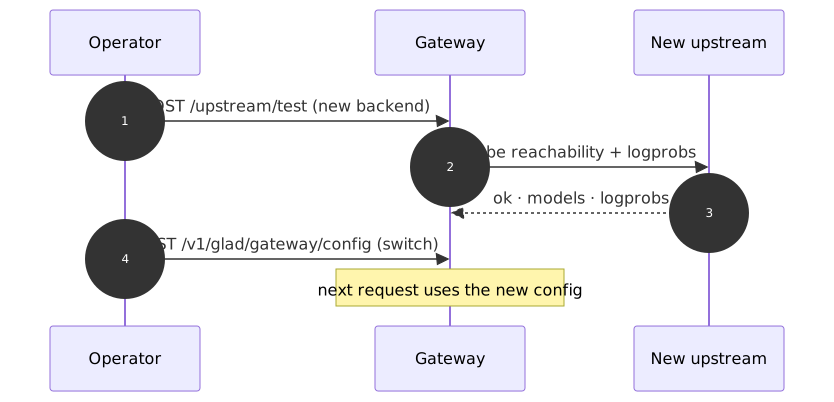
- Test the new backend first (
/upstream/test) — confirm reachability and log-prob support. - Switch (
POST /v1/glad/gateway/configor roll new env vars). The closed-book axis is cross-model and needs no per-model step — it works on the new upstream immediately.
In Kubernetes, prefer a rolling update of the Deployment with the new env vars; the readiness probe keeps traffic on healthy pods throughout.
Troubleshooting Runbook
| Symptom | Likely cause | Fix |
|---|---|---|
/health ok=false | Upstream unreachable | Check upstream_base_url, network policy, and that the model server is up |
axes_gated contains halluc_closedbook | Upstream returns no log-probs | Upgrade to Ollama ≥ 0.12 (native log-probs), use a model/tier that supports logprobs, or add a log-prob sidecar for older Ollama |
connection refused on switch | Wrong port or /v1 appended | Use the base URL (no trailing /v1); the gateway adds the path |
| Hosted API gates closed-book | Provider/model omits log-probs | Try another model on the provider, or accept that halluc_closedbook stays gated |
| First request very slow | Model cold-loading on first boot | Expected once per boot — the gateway warms the upstream proactively; subsequent requests are fast |
internal_vllm: stopped with type: internal | Subprocess failed to start | Check internal_vllm_cmd and GPU availability in container logs |
| 5xx from the gateway under load | Upstream saturated | Scale the model server; the gateway itself is rarely the limit |
| Benign prompts blocked | Thresholds too aggressive | Tune per-axis thresholds — see Detection Thresholds |
See Also
- Upstream Backends — the connection test and upstream-adapter mechanics
- Gateway Configuration — every
GatewayConfigfield - Environment Variables — the full
GW_*reference - Enforcement Modes — blocking vs passthrough
- Detection Thresholds — per-axis tuning
- API Response Format — the
geodesia{}payload