Architecture
Geodesia G-1 is composed of two independent services that work together: the Gateway and the Product Backend. Both expose REST APIs; the web UI communicates with both.

Two cooperating services share one detection engine and one audit database. The web UI talks to both through a reverse proxy.
Service 1 — Geodesia Gateway
Default port: 8800
The Gateway is the real-time enforcement layer. It receives every chat request from your application, screens it, forwards it to the upstream LLM, then validates the response — all before returning anything to the caller.
Key responsibilities:
| Responsibility | How |
|---|---|
| Prompt screening | Runs 2 input-region detection axes (prompt safety + jailbreak) on every incoming message before forwarding |
| Response validation | Runs 3 output-region axes (context faithfulness, closed-book fabrication, answer safety) on every generated response |
| Streaming mid-brake | Monitors every N tokens during streaming and can halt generation before it completes |
| RAG / Knowledge Base | Retrieves document chunks (LanceDB + BGE-M3), injects context, verifies claims cite-by-cite |
| Causal XAI | Computes token-level attribution entirely black-box (no model internals needed) |
| Compliance logging | Writes one row per request to the shared audit SQLite database |
| Config persistence | Saves the upstream backend selection, thresholds, and model to a JSON file so the setup survives restarts |
What the Gateway does NOT do
The Gateway deliberately has no compliance pages, FRIA, reports, or audit exports. Those belong to the Product Backend, which can run on a separate machine without a GPU.
Service 2 — Product Backend
Default port: 8199
The Product Backend handles everything that does not need to happen in the real-time request path: compliance, audit, FRIA, kill switch, reports, threshold management, and the direct evaluate API for batch scoring.
Key responsibilities:
| Responsibility | How |
|---|---|
| Direct evaluate | POST /glad/evaluate — a single call that generates a response AND scores it (for batch workflows) |
| Compliance dashboard | Aggregates call metrics from the audit DB for the live dashboard |
| FRIA | Creates, manages, and exports EU AI Act Fundamental Rights Impact Assessment dossiers |
| Human oversight | Queues flagged calls for human review; tracks escalation decisions |
| Kill switch | Instant service suspension; enforced within the configured time window |
| Audit chain | Maintains the HMAC-linked append-only ledger; provides a verification endpoint |
| Reports | Generates PDF/DOCX audit bundles, deployer transparency manuals |
| Threshold prefs | Stores deployer-specific detection thresholds in the database |
| Model catalog | Lists available checkpoints; handles model switching |
Running without a GPU
The Product Backend can run without a loaded language model. Compliance pages, dashboard, FRIA, and audit features do not require the AI model. Set GLAD_DEVICE=cpu and omit MODEL_HOST_PATH to start in compliance-only mode.
The Detection Engine
Both services share a single Geodesia detection engine, which comes in two cooperating tiers:
| Mode | What runs | When |
|---|---|---|
| Standard | G1-Hummingbird reads the prompt, context and answer and produces the nine independent detection axes in a single forward pass. Fast and lightweight — milliseconds per request on a small GPU (or CPU). | Every request |
| Extended thinking | The same nine axes, scored with additional depth. Requested per request through Thinking Levels (thinking_level 1–3, 3 = MAX). Off by default — the extra capacity is never loaded, so it costs nothing until asked for. | When thinking_level ≥ 1 is requested |
G1-Hummingbird is model-agnostic: the same checkpoint works against any upstream, from a locally hosted model to the OpenAI API.
The one exception is the closed-book fabrication axis, which additionally uses per-token log-probabilities from the upstream LLM to compute uncertainty signals. If the upstream does not expose log-probabilities (e.g., Ollama < 0.12, or cloud providers such as Bedrock/Vertex), this axis is automatically disabled and the gateway operates with the remaining axes. Most OpenAI-compatible servers — and Ollama ≥ 0.12 — do expose them, so this axis is on by default.
Extended thinking is additional depth on the same nine axes, not a different product: level 1 only spends it on the turns the standard path is unsure about, levels 2 and 3 spend it on every turn. The response shape, the axis names and the thresholds are identical at every level — which keeps the standard path fast while letting high-stakes deployments buy extra assurance exactly where they want it.
Data Flow: A Single Chat Request
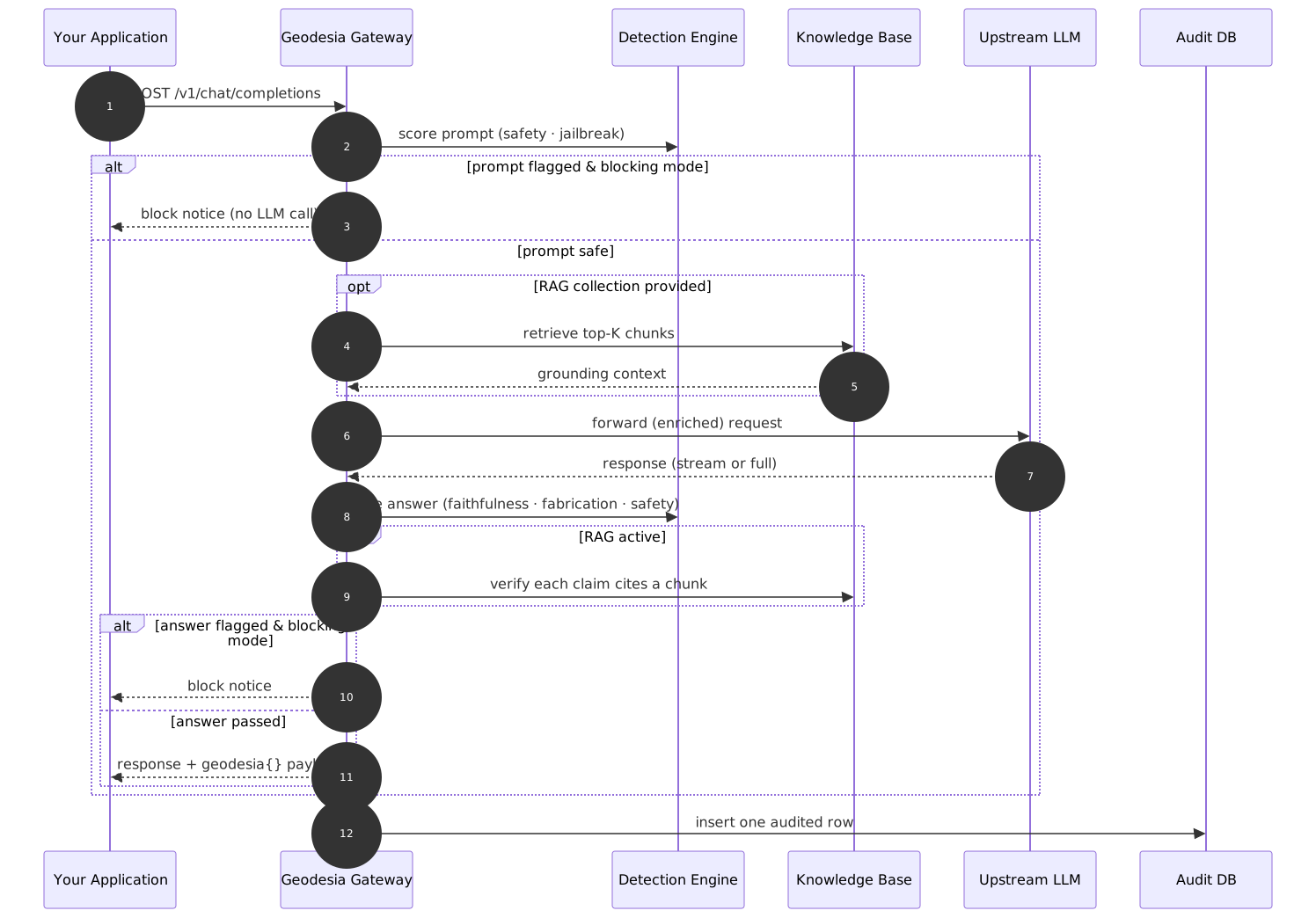
The full lifecycle of one chat request: input screening, optional retrieval, generation, output validation, and audit logging.
Persistence
| Store | Purpose | Location |
|---|---|---|
| SQLite database | Calls, sessions, human reviews, FRIA records, watermarks, kill-switch state | configurable via database_path in config.yaml |
| Gateway config | Upstream backend selection, thresholds, model — persisted across restarts | JSON file, path via GW_CONFIG_FILE |
| Detection engine | Validator weights | bundled with the deployment |
| RAG store | Document embeddings (vector index) | configurable via the knowledge-base directory setting |
Nginx / Reverse Proxy Layout (Production)
In production, a single Nginx instance routes traffic to both services:
location /gw/    { proxy_pass http://127.0.0.1:8800/; }
location /v1/    { proxy_pass http://127.0.0.1:8199/v1/; }
location /       { root /var/www/glad/dist; try_files $uri /index.html; }
The web UI talks to the gateway at /gw/ and to the product backend at /v1/. Both are served under the same origin to avoid CORS issues.